Janna Theme License is not validated, go to the theme options page to validate the license, you need a single license for each domain name.
What happens when you clear the cache on Instagram?
Every mobile app collects cache in the background to improve user experience. Cache data includes your login information, search results, frequently visited pages, and other media files. This practice makes more sense on social apps like Instagram و Facebook To quickly download media files on the go. While we don't recommend clearing your app cache frequently, it does have some benefits. This article will cover everything you need to know about clearing your Instagram cache.
Unlike Snapchat, Instagram doesn't allow you to clear the cache for the app itself. You need to open the App Info menu on Android and clear the cache. Before we show you how to do this, let's understand what Instagram cache collects in the first place.
Cache is a set of files used to speed up the loading and operation of your apps. Instagram stores cache for almost every app feature you use frequently. For example, you might frequently check your profile or someone else's Instagram account. Instagram stores the data and uses it the next time you try to visit the same account. This way, the app doesn't need to load photos and videos from scratch. It can use the collected cache files and load them immediately.
Collecting cache helps Instagram remember your search queries and load the Explore page quickly. This benefits users in two ways. First, Instagram doesn't need to load all the media files. Second, it reduces internet usage and speeds up the app experience.
When you continue using Instagram for a few months or years, the app quietly creates a cache in the background. However, you can't see or access these files. You can only see the amount of cache data Instagram has collected (in megabytes or gigabytes).
Why do you need to clear your Instagram cache?
There are two main reasons to clear your phone's cache on Instagram. The first is to free up storage space. Over the years, the Instagram app may have accumulated hundreds of megabytes of cache data. If you're a Reels addict, this number could be as high as a few gigabytes. When you're running low on storage space on your phone and want to free up internal memory without deleting large media files, you should check your frequently used apps (like Instagram in this case) for any accumulated cache data and clear it.
Sometimes, Instagram may keep a lot of old or corrupted cache which can lead to issues like the app crashing. Does not update feed , Or Do not load images Or videos, etc. When Instagram starts misbehaving on your phone, you can clear the cache and try again.
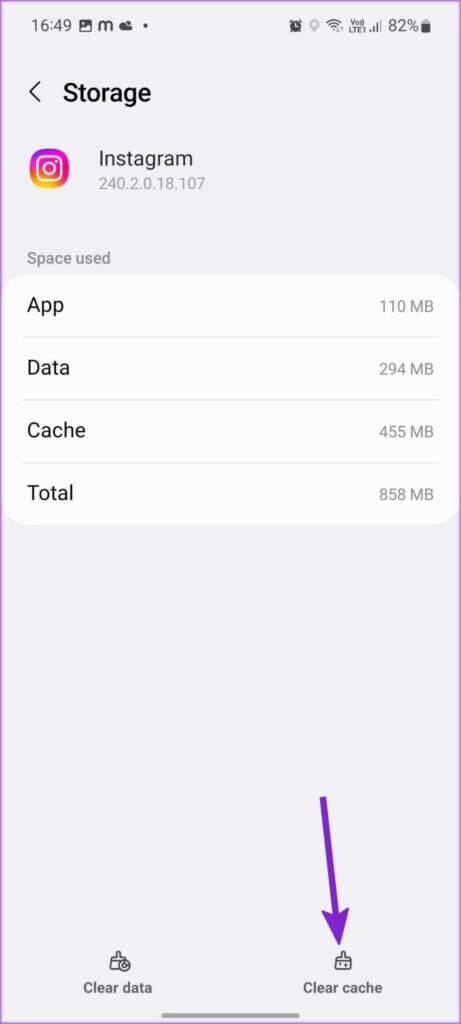
Step 3: Click on “i” button Small and open Application Information List.
Step 4: Open Storage of Usage list.
Step 5: Verify cache data On Instagram and click on Clear cache.
Check Instagram cache on iPhone
Unlike Android, you can't clear Instagram's cache on iPhone. You can check the documents and data collected by Instagram on your iPhone and take necessary action.
Step 5: Verify Instagram app size (Original app size), document size, and data (cache).
You have a choice between two options.
Instagram dump: This will simply remove Instagram from your phone but will not affect the collected documents and data.
Delete the application: This will delete the app and all associated data from your iPhone.
You can delete Instagram and reinstall it from the App Store to start fresh. There's no way to clear Instagram cache data without deleting the app on your iPhone.
It will clear cache and delete your Instagram photos.
When you clear your Instagram cache, you're only deleting the files the app stores on your phone. It doesn't delete any media you've posted from your Instagram account; they'll remain safe on the company's services. So, downloaded photos, videos, and Instagram Reels will remain intact. You'll only notice longer loading times initially, as the app loads all the data from scratch and compiles a new cache.
What happens to Instagram jobs?
Deleting your Instagram snap will not delete your conversations as they remain secure on Instagram servers.
Obvious things
While it's recommended to clear your Instagram cache, you shouldn't do it too often, as it impacts the app experience. Also, don't worry about Instagram deleting your media files or messages. Your data is securely stored on Instagram's servers.