Steam by Valve هي إحدى خدمات توزيع ألعاب الفيديو الرائدة لنظامي التشغيل Windows و macOS. الخدمة التي بدأت كوسيلة لتقديم تحديثات تلقائية لألعاب Valve تضم الآن مجموعة تضم أكثر من 35000 لعبة تم تطويرها بواسطة مطورين مشهورين عالميًا بالإضافة إلى ألعاب مستقلة. لقد نجحت سهولة تسجيل الدخول إلى حساب Steam الخاص بك والحصول على جميع الألعاب المشتراة والمجانية على أي نظام تشغيل في إبهار اللاعبين في جميع أنحاء العالم. القائمة الطويلة من الميزات الملائمة للاعبين ، مثل القدرة على الدردشة النصية أو الصوتية ، واللعب مع الأصدقاء ، والتقاط ومشاركة لقطات الشاشة والمقاطع داخل اللعبة ، والتحديثات التلقائية ، والانضمام إلى مجتمع الألعاب ، قد رسخت Steam كشركة رائدة في السوق. في مقال اليوم ، سنناقش كيفية إصلاح رمز الخطأ Steam e502 l3 في Windows 10، من أجل بث اللعب دون انقطاع على Steam!
كيفية إصلاح رمز الخطأ Steam e502 l3 في نظام التشغيل Windows 10
مع وجود عدد كبير من اللاعبين الذين يعتمدون على Steam ، قد يفترض المرء أن البرنامج لا تشوبه شائبة على الإطلاق. ومع ذلك ، لا شيء جيد يأتي بسهولة. لقد ناقشنا بالفعل وقدمنا إصلاحات لعدد من المشكلات المتعلقة بـ Steam. لم نتمكن من خدمة طلبك. يرجى المحاولة مرة أخرى لاحقًا ، يعد الخطأ ، مثل الآخرين ، أمرًا شائعًا جدًا ويتم مواجهته عندما يحاول المستخدمون إكمال عملية شراء ، خاصة أثناء حدث المبيعات. يتبع معاملات الشراء الفاشلة متجر Steam البطيء.
لماذا برنامج Steam يظهر رمز الخطأ e502 l3؟
بعض الأسباب المحتملة وراء هذا الخطأ مذكورة أدناه:
- في بعض الأحيان قد لا يتوفر خادم Steam في منطقتك. قد يكون أيضًا بسبب انقطاع الخادم.
- قد لا يكون لديك اتصال إنترنت ثابت ، وبالتالي ، لا يمكنك الاتصال بمتجر Steam.
- ربما قام جدار الحماية الخاص بك بتقييد Steam والميزات المرتبطة به.
- قد يكون جهاز الكمبيوتر الخاص بك مصابًا ببرامج ضارة أو فيروسات غير معروفة.
- قد يكون ذلك بسبب التعارض مع تطبيقات الطرف الثالث التي قمت بتثبيتها مؤخرًا.
- ربما يكون تطبيق Steam تالفًا أو قديمًا.
الجانب الفضي لكونه تطبيقًا يستخدمه محترفو الألعاب هو أنهم سيجدون حلًا لمشكلة ما حتى قبل قيام المطورين بذلك. لذلك ، على الرغم من عدم وجود تقرير رسمي عن الخطأ ، فقد قام مجتمع اللاعبين بتضييقه إلى ستة إصلاحات مختلفة للتخلص من Steam Error e502 l3.
تحقق من حالة خادم Steam
من المعروف أن خوادم Steam تتعطل في كل مرة يتم فيها بث حدث بيع كبير. في الواقع ، لقد انخفض سعرها خلال أول ساعة أو ساعتين من عملية بيع كبيرة. مع اندفاع عدد هائل من المستخدمين لشراء لعبة بخصم كبير إلى العدد المقابل من معاملات الشراء التي تحدث في وقت واحد ، يبدو أن تعطل الخادم أمر معقول. يمكنك التحقق من حالة خوادم Steam في منطقتك من خلال زيارة صفحة الويب Steam Sstatus
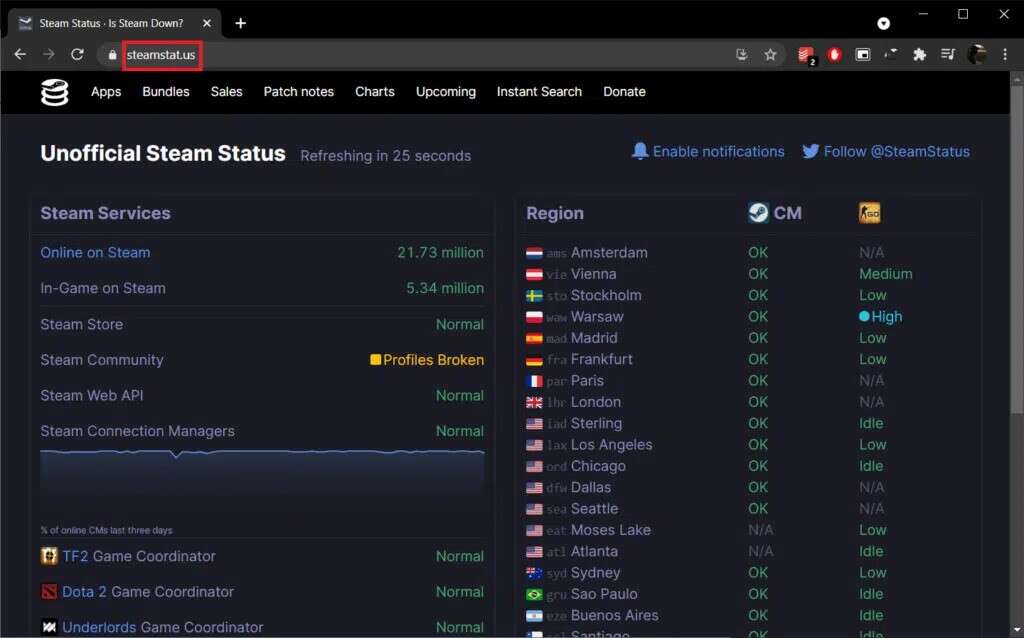
- إذا تعطلت خوادم Steam بالفعل ، فلا توجد طريقة أخرى لإصلاح خطأ Steam e502 l3 ، ولكن انتظار عودة الخوادم مرة أخرى. يستغرق مهندسوهم عمومًا بضع ساعات لإعادة تشغيل الأشياء وتشغيلها مرة أخرى.
- إذا لم يكن كذلك ، فجرّب الحلول المذكورة أدناه لإصلاح Steam Error e502 l3 في أجهزة الكمبيوتر التي تعمل بنظام Windows 10.
الطريقة الأولى: استكشاف مشكلات الاتصال بالإنترنت وإصلاحها
من الواضح تمامًا ، إذا كنت تتطلع إلى ممارسة لعبة عبر الإنترنت أو إجراء معاملة عبر الإنترنت ، فيجب أن يكون اتصالك بالإنترنت على الفور. يمكنك اختبار سرعة الإنترنت باستخدام أدوات عبر الإنترنت. إذا بدا الاتصال مهتزًا ، فأعد تشغيل جهاز التوجيه أو المودم أولاً ثم قم بتشغيل مستكشف أخطاء الشبكة ومصلحها كما يلي:
1. اضغط على مفتاحي Windows + I في نفس الوقت لتشغيل إعدادات Windows.
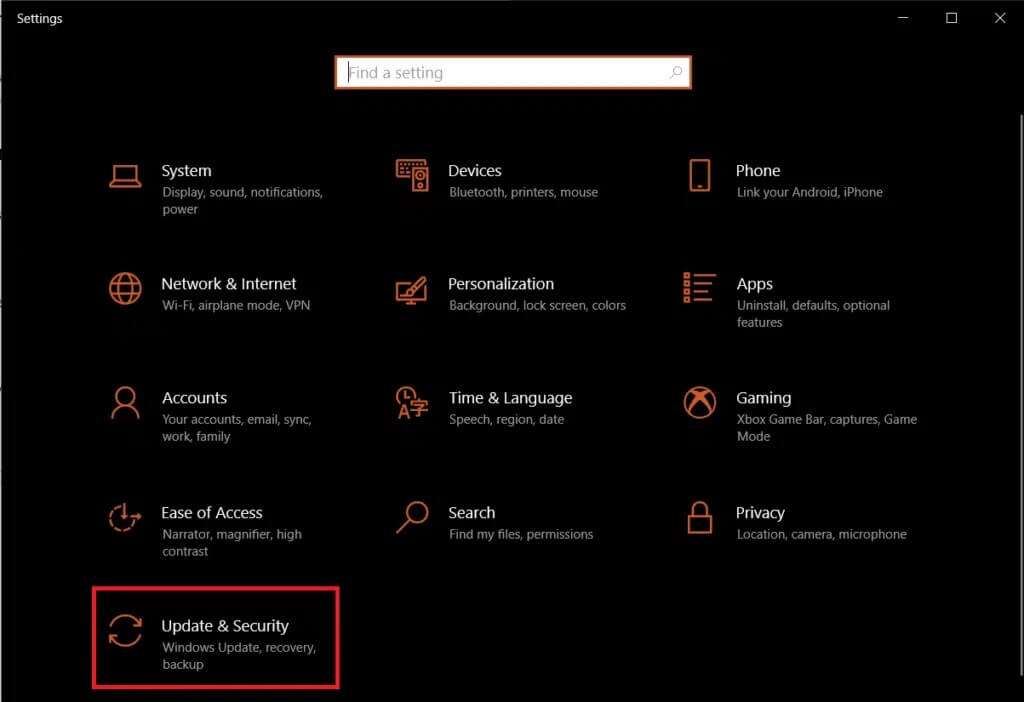
2. انقر فوق التحديث والأمان ، كما هو موضح.



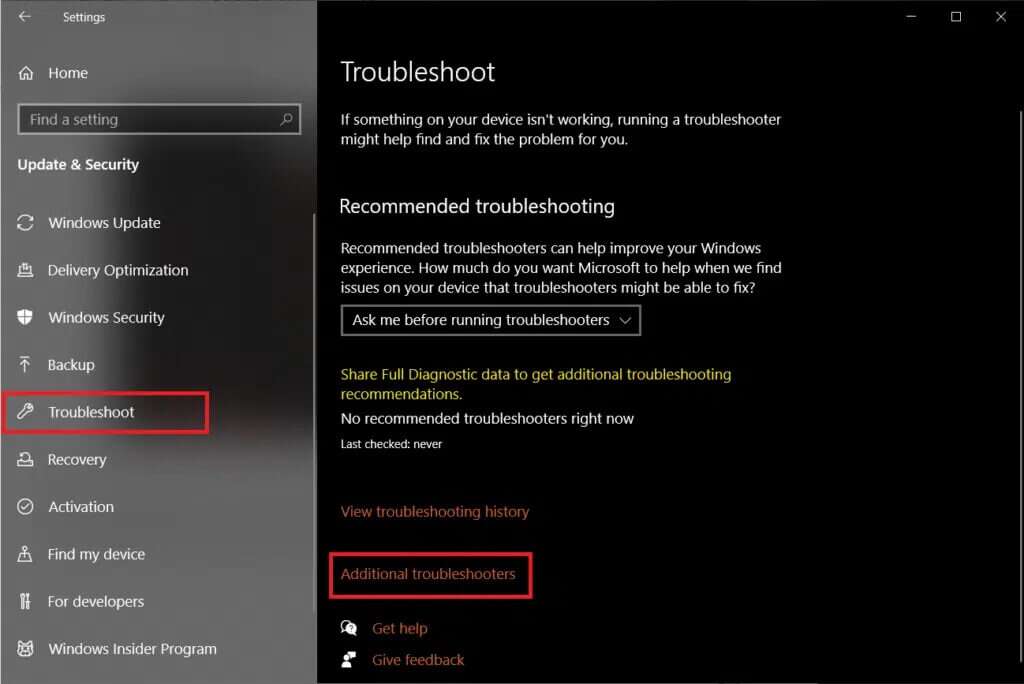
3. انتقل إلى قائمة “استكشاف الأخطاء وإصلاحها” وانقر فوق “أدوات استكشاف الأخطاء وإصلاحها الإضافية”.
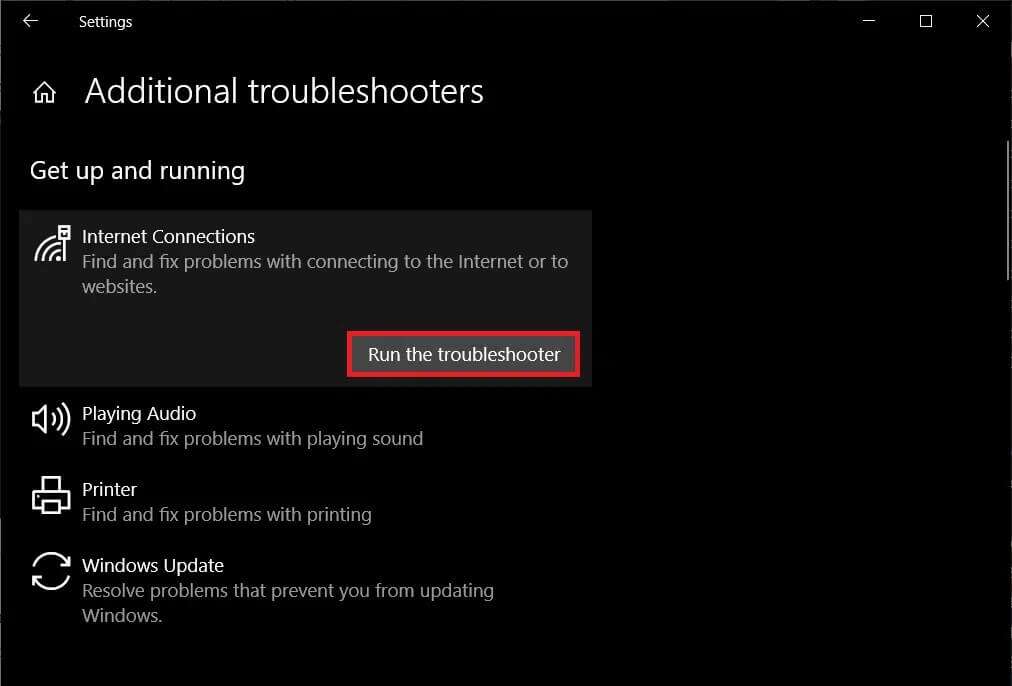
4. حدد مستكشف أخطاء اتصالات الإنترنت ومصلحها وانقر فوق تشغيل مستكشف الأخطاء ومصلحها ، كما هو موضح بشكل مميز.
5. اتبع الإرشادات التي تظهر على الشاشة لإصلاح المشكلات إذا تم اكتشافها.
الطريقة 2: إلغاء تثبيت برامج مكافحة الغش
نظرًا لأن الألعاب عبر الإنترنت أصبحت شريان الحياة بالنسبة للكثيرين ، فقد زادت الحاجة إلى الفوز بشكل كبير أيضًا. وقد أدى ذلك إلى لجوء بعض اللاعبين إلى ممارسات غير أخلاقية مثل الغش والقرصنة. من أجل مواجهتها ، تم تصميم Steam بحيث لا يعمل مع برامج مكافحة الغش هذه. يمكن أن يؤدي هذا التعارض إلى ظهور بعض المشكلات بما في ذلك Steam Error e502 l3. إليك كيفية إزالة تثبيت البرامج في نظام التشغيل Windows 10:
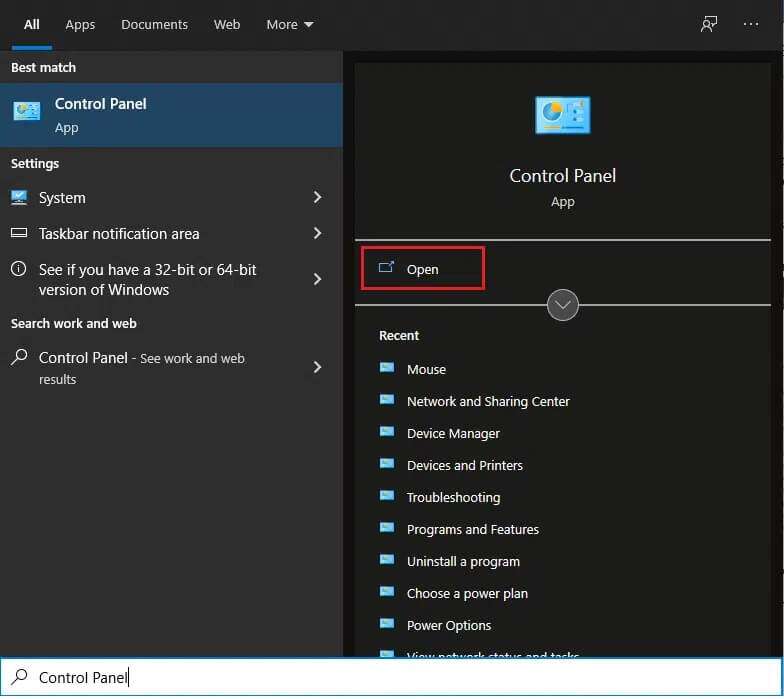
1. اضغط على مفتاح Windows ، واكتب لوحة التحكم ، وانقر فوق فتح ، كما هو موضح.
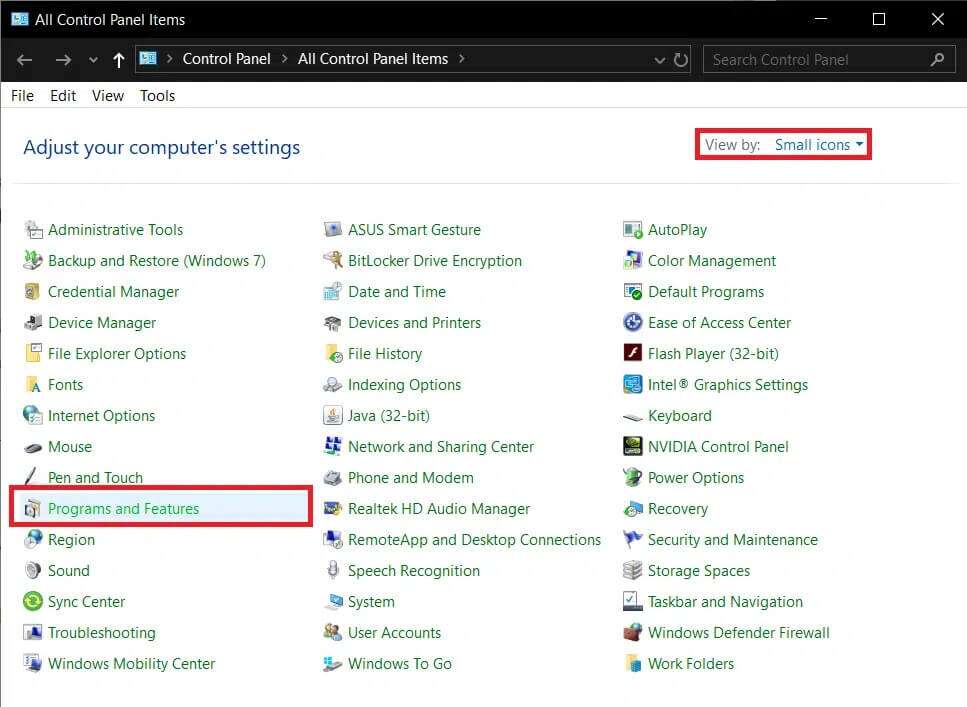
2. قم بتعيين عرض بواسطة> الرموز الصغيرة ، ثم انقر فوق البرامج والميزات.
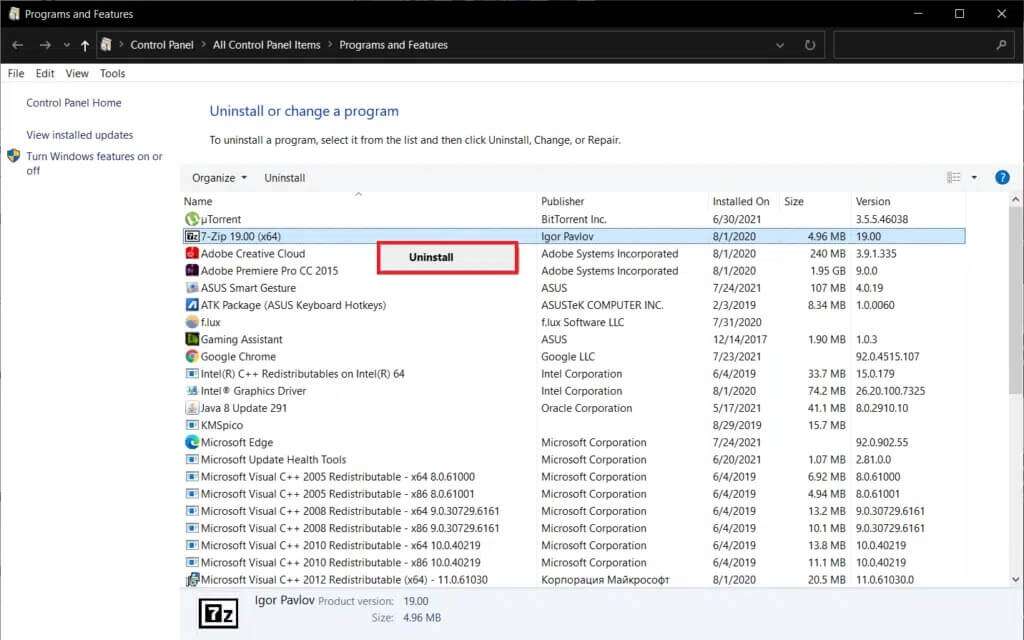
3. انقر بزر الماوس الأيمن فوق تطبيقات مكافحة الغش ، ثم انقر فوق “إلغاء التثبيت” ، كما هو موضح أدناه.
الطريقة الثالثة: السماح لـ Steam عبر جدار حماية Windows Defender
أحيانًا يتم تقييد برامج الجهات الخارجية مثل Steam من الوصول إلى اتصال الشبكة إما عن طريق Windows Defender Firewall أو عن طريق برامج مكافحة فيروسات صارمة تابعة لجهات خارجية. قم بتعطيل برنامج مكافحة الفيروسات المثبت على نظامك مؤقتًا ، وتأكد من السماح لـ Steam عبر جدار الحماية باتباع الخطوات التالية:
1. قم بتشغيل لوحة التحكم كما كان من قبل.
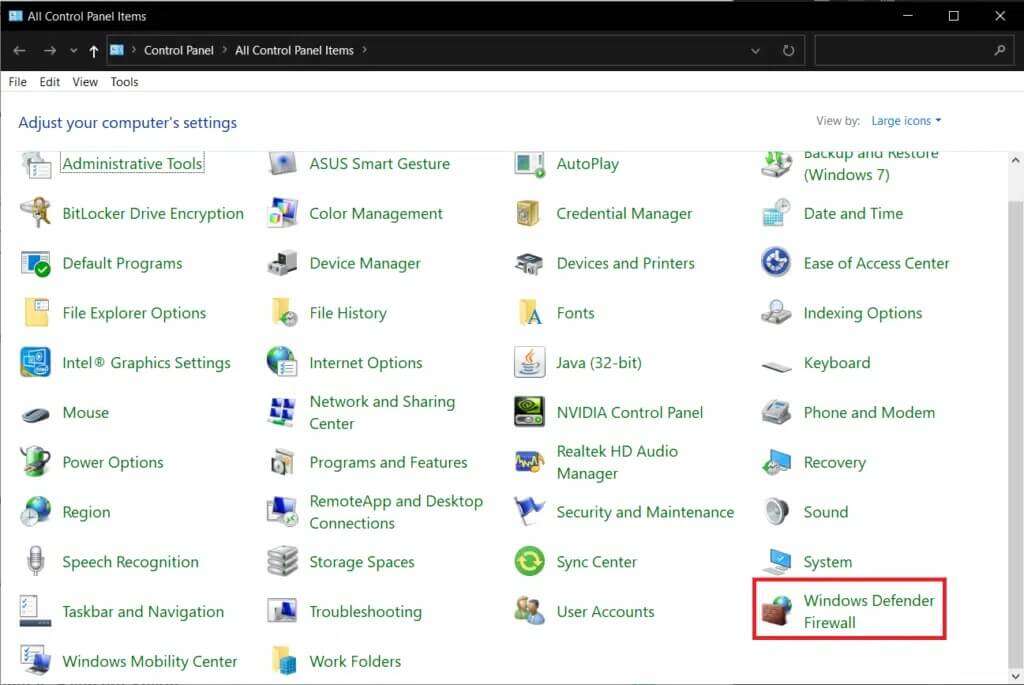
2. قم بتعيين عرض بواسطة> الرموز الكبيرة وانقر فوق جدار حماية Windows Defender ، كما هو موضح.
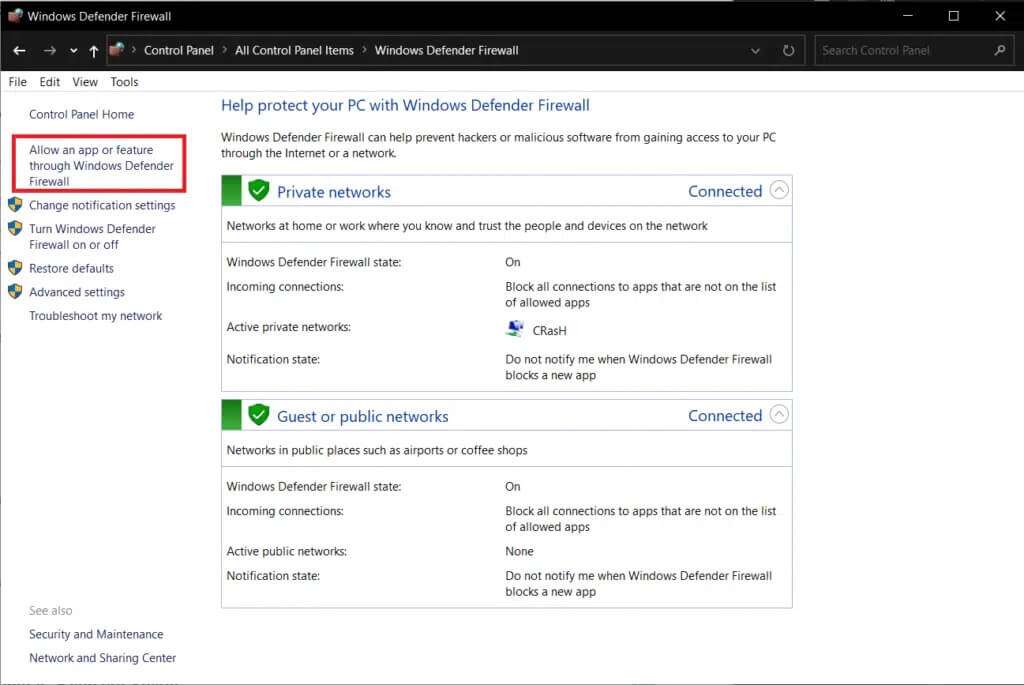
3. انقر فوق السماح لتطبيق أو ميزة من خلال جدار حماية Windows Defender الموجود في الجزء الأيمن.
4. في النافذة التالية ، ستظهر لك قائمة بالتطبيقات والميزات المسموح بها ولكن لتعديل أذوناتها أو وصولها. انقر فوق زر تغيير الإعدادات.
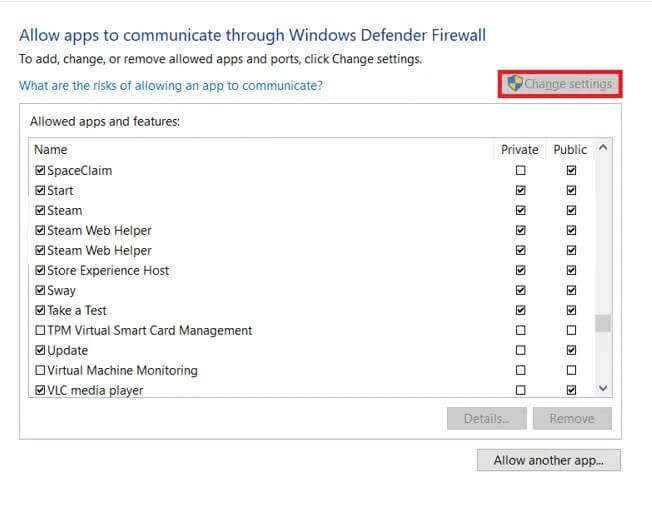
5. قم بالتمرير لأسفل في القائمة للعثور على Steam والتطبيقات المرتبطة به. ضع علامة في المربع خاص وعام لكل منهم ، كما هو موضح أدناه.
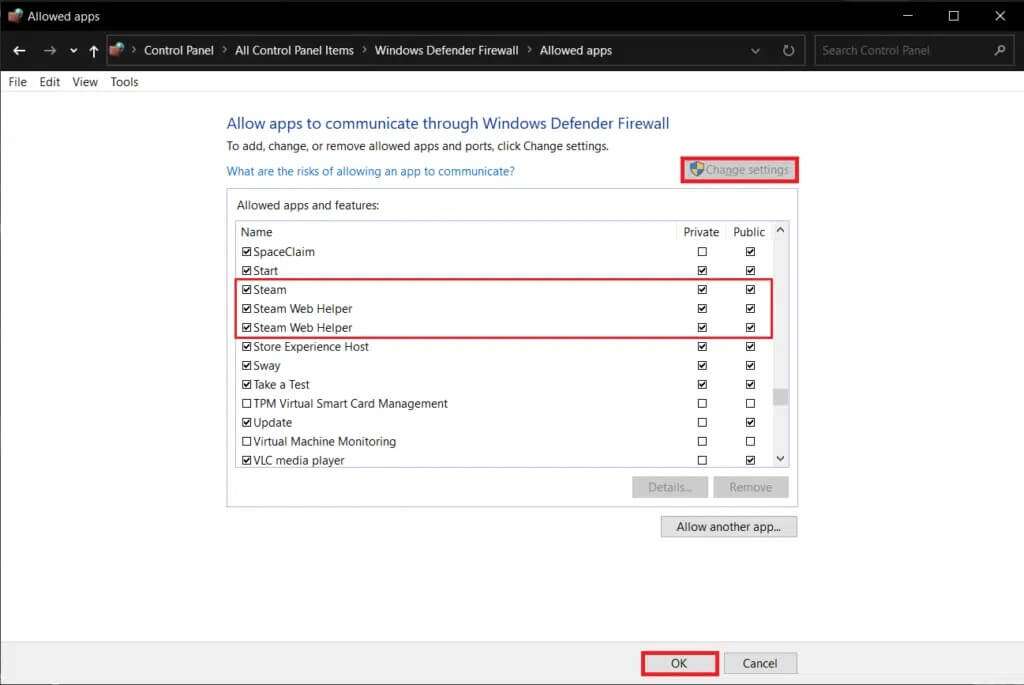
6. انقر فوق “موافق” لحفظ التغييرات الجديدة وإغلاق النافذة. حاول إكمال الشراء الآن على Steam.
الطريقة الرابعة: المسح بحثًا عن البرامج الضارة
من المعروف أن البرامج الضارة والفيروسات تخل بعمليات الكمبيوتر اليومية وتتسبب في عدد من المشكلات. واحد منهم هو خطأ Steam e502 l3. قم بإجراء فحص كامل للنظام باستخدام أي برنامج مكافحة فيروسات متخصص قد تكون قمت بتثبيته أو ميزة Windows Security الأصلية كما هو موضح أدناه:
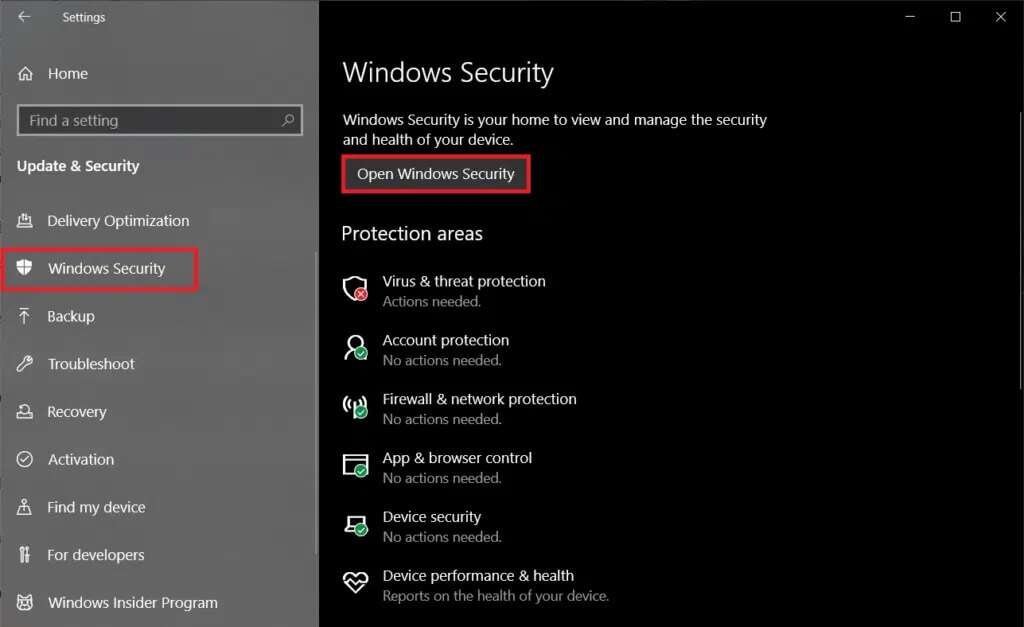
1. انتقل إلى الإعداد> التحديث والأمان كما هو موضح.
2. انتقل إلى صفحة أمان Windows وانقر على زر فتح أمان Windows ، الموضح مظللًا.
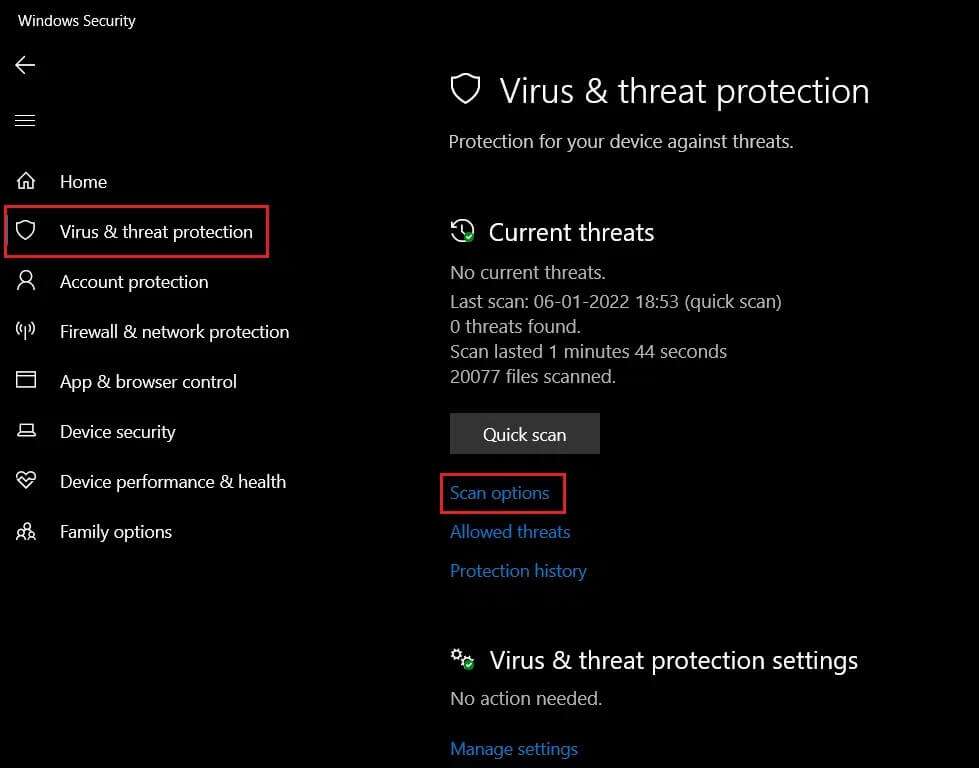
3. انتقل إلى قائمة الحماية من الفيروسات والتهديدات وانقر فوق خيارات الفحص في الجزء الأيمن.
4. اختر Full Scan في النافذة التالية وانقر فوق الزر Scan now لبدء العملية.
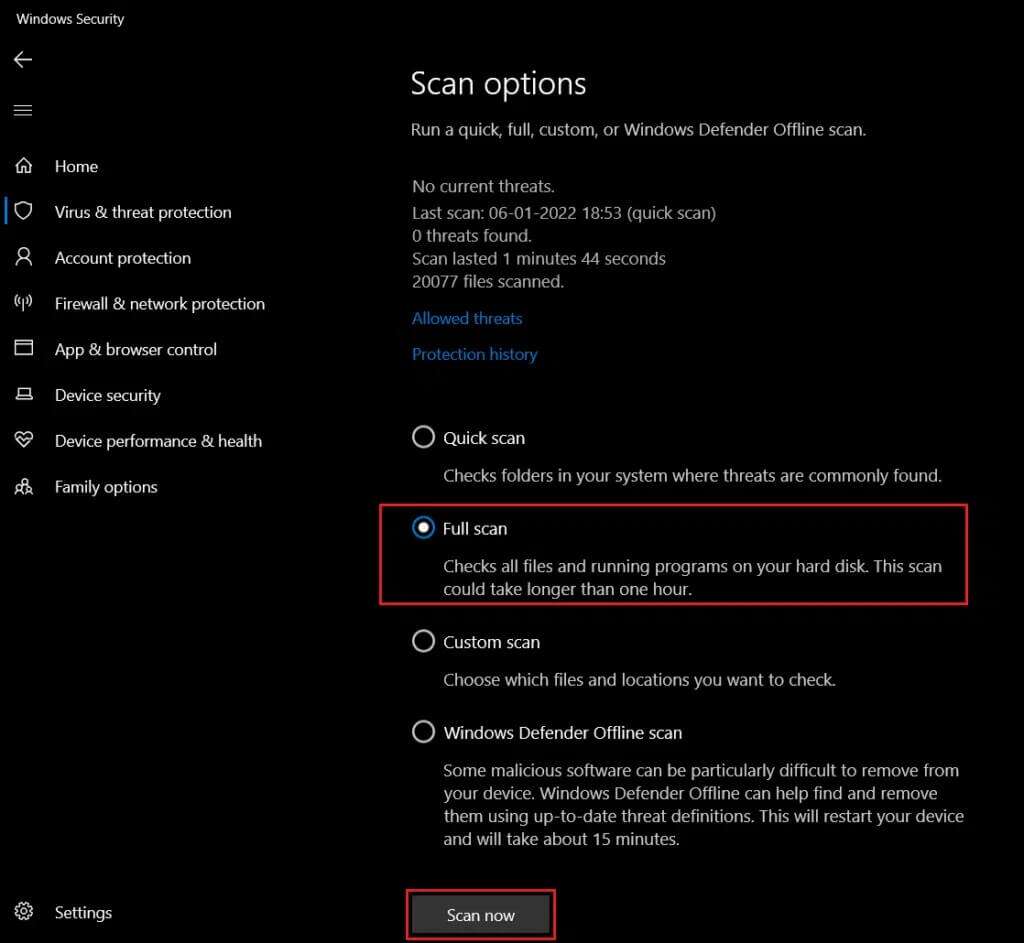
ملاحظة: سيستغرق الفحص الكامل ساعتين على الأقل حتى ينتهي مع عرض شريط التقدم الوقت المقدر المتبقي وعدد الملفات التي تم فحصها حتى الآن. يمكنك الاستمرار في استخدام جهاز الكمبيوتر الخاص بك في غضون ذلك.
5. بمجرد اكتمال الفحص ، سيتم سرد أي وجميع التهديدات التي تم العثور عليها. قم بحلها على الفور من خلال النقر على زر بدء الإجراءات.
الطريقة الخامسة: تحديث Steam
أخيرًا ، إذا لم تنجح أي من الطرق المذكورة أعلاه في الحيلة واستمر الخطأ e502 l3 في إزعاجك ، فحاول تحديث تطبيق Steam. من المحتمل جدًا أن يكون الإصدار الحالي الذي قمت بتثبيته به خلل متأصل وقد أصدر المطورون تحديثًا مع إصلاح الخطأ.
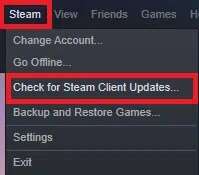
1. قم بتشغيل Steam وانتقل إلى شريط القائمة.
2. الآن ، انقر فوق Steam متبوعًا بـ Check for Steam Client Updates …
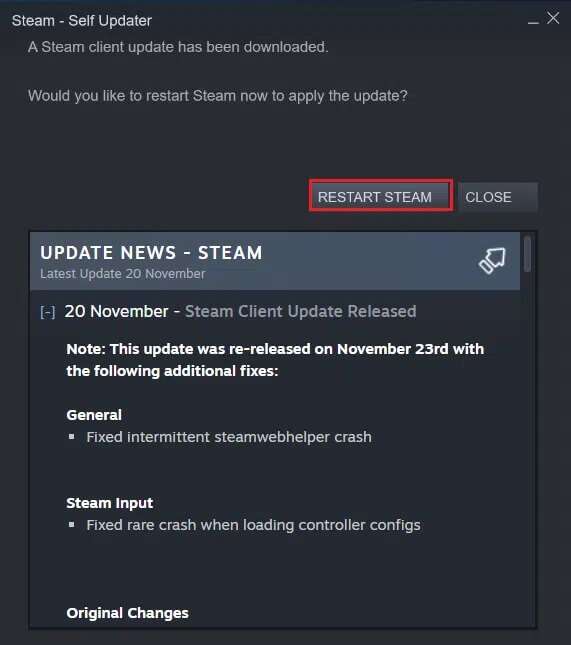
3 أ. سيقوم برنامج Steam – Self Updater
بتنزيل التحديثات تلقائيًا ، إذا كانت متوفرة. انقر فوق إعادة تشغيل Steam لتطبيق التحديث.
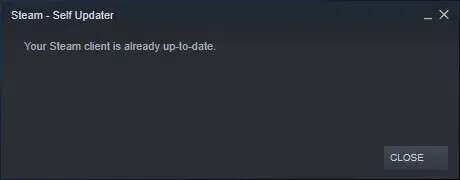
3 ب. إذا لم يكن لديك تحديثات ، فسيتم عرض رسالة عميل Steam الخاصة بك بالفعل ، على النحو التالي.
الطريقة 6: أعد تثبيت Steam
علاوة على ذلك ، بدلاً من مجرد التحديث ، سنقوم بإلغاء تثبيت الإصدار الحالي للتخلص من أي ملفات تطبيق تالفة / معطلة ثم تثبيت أحدث إصدار من Steam من جديد. هناك طريقتان لإلغاء تثبيت أي تطبيق في نظام التشغيل Windows 10: الأولى من خلال تطبيق الإعدادات والأخرى من خلال لوحة التحكم. دعونا نتبع خطوات هذا الأخير:
1. انقر فوق ابدأ ، واكتب لوحة التحكم وانقر فوق فتح.
2. قم بتعيين عرض بواسطة> الرموز الصغيرة وانقر فوق البرامج والميزات ، كما هو موضح.
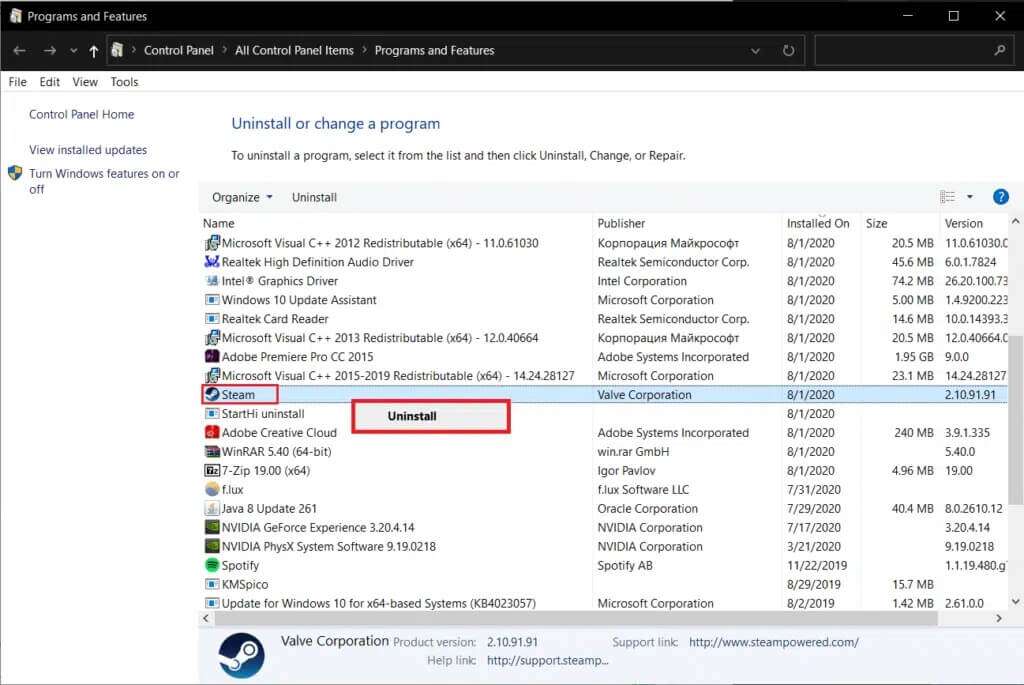
3. حدد موقع Steam ، وانقر فوقه بزر الماوس الأيمن واختر إلغاء التثبيت ، كما هو موضح أدناه.
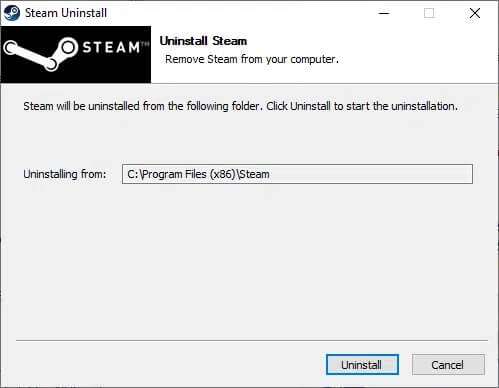
4. في نافذة Steam Uninstall ، انقر فوق Uninstall (إلغاء التثبيت) لإزالة Steam.
5. أعد تشغيل الكمبيوتر بعد إلغاء تثبيت Steam كإجراء جيد.
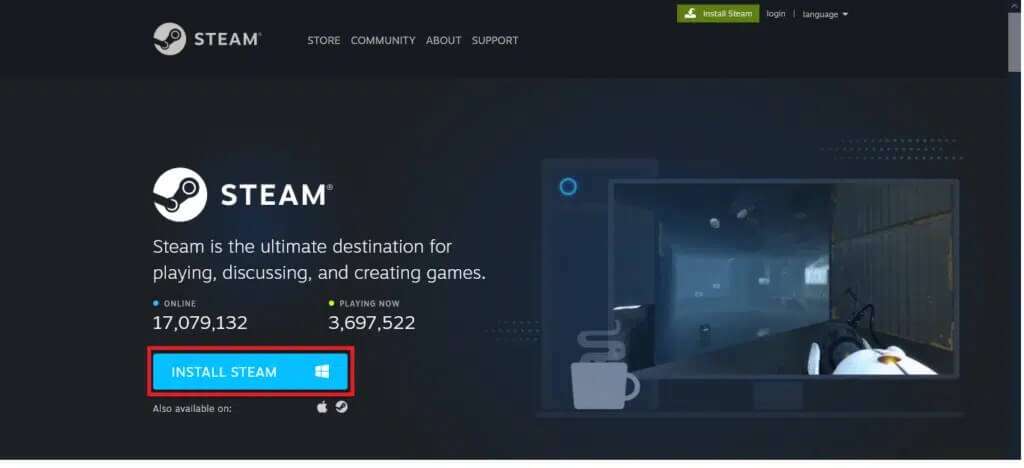
6. قم بتنزيل أحدث إصدار من Steam من متصفح الويب الخاص بك ، كما هو موضح.
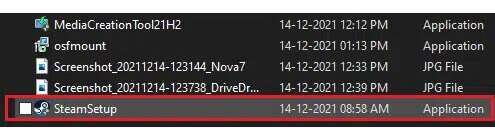
7. بعد التنزيل ، قم بتشغيل ملف SteamSetup.exe الذي تم تنزيله بالنقر فوقه نقرًا مزدوجًا.
8. في معالج إعداد Steam ، انقر فوق الزر “التالي”.
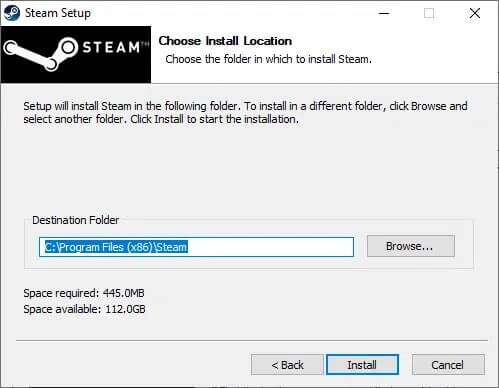
9. اختر مجلد الوجهة باستخدام خيار التصفح… أو احتفظ بالخيار الافتراضي. ثم ، انقر فوق تثبيت ، كما هو موضح أدناه.
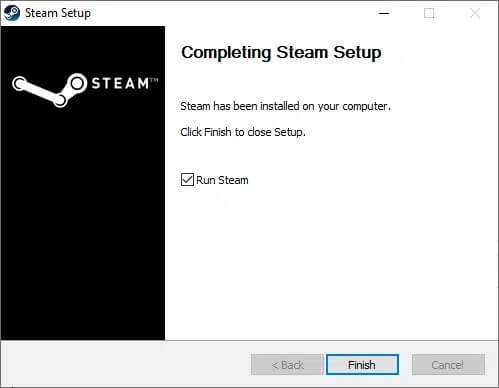
10. انتظر حتى يكتمل التثبيت وانقر فوق “إنهاء” ، كما هو موضح.
اسمحوا لنا أن نعرف الطريقة التي تم عبرها إصلاح رمز الخطأ Steam E502 l3 في Windows 10. قم أيضًا بإسقاط ألعاب Steam المفضلة لديك أو المشكلات أو الاقتراحات في قسم التعليقات أدناه.